This process can be used to Cancel or Reschedule an existing lesson.
Note, the online process is actyive up to 1 hour prior to the scheduled lesson start time, however if you are cancelling within 24 hours of the start you will automatically forfeit your lesson cost, as per the terms and conditions.
Reschedule a Lesson
Follow the cancellation process below. Any paid dollar amount or voucher will be added back to your account as long as more than 24 hours notice has been provided. In this case you can then book another lesson online using your credit or voucher. This online process will work up to 1 hour prior to the lesson. Within 1 hour you will need to call the office. Note the 24 hour cancellation policy applies even if you cancel online.
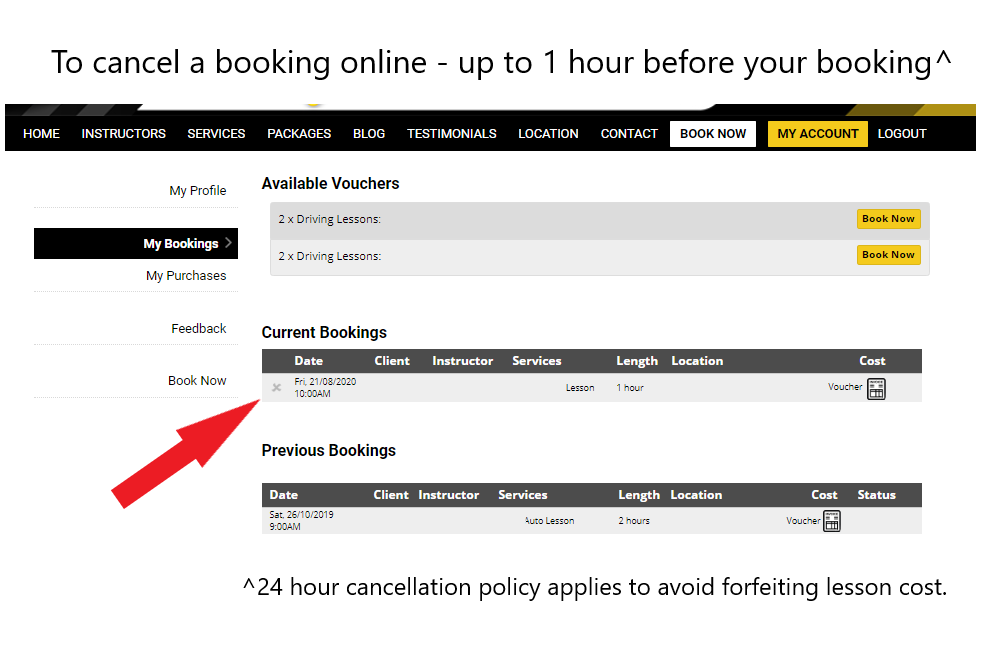
To cancel your booking online:
1/ Login to your account
2/ Select My Account from the top menu
3/ Select My Bookings from the side menu
4/ Identify the current booking you wish to cancel
5/ Select the grey X on the left hand side of your booking
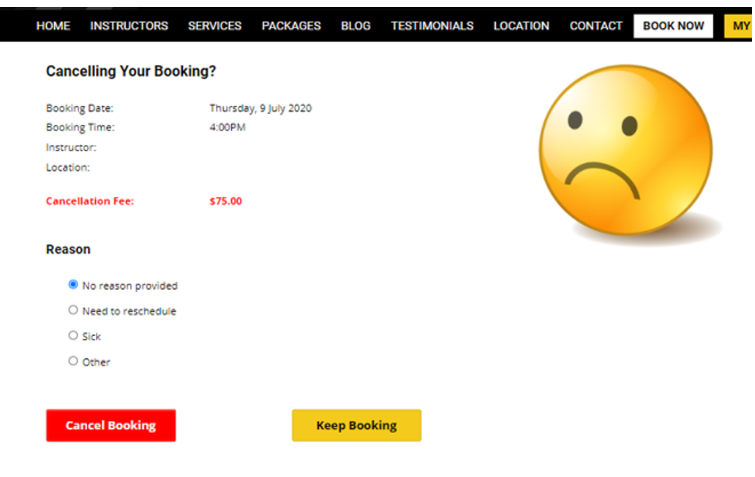
6/ Next you will have to confirm the cancellation (see below).
Note: if you are cancelling within the minimum cancellation period (24 hours) you will see the cancellation fee. Otherwise the voucher or credit will be applied to your account and can be re-used for a new booking.
Confirm your cancellation: